
In short
Hornetsecurity 365 Total Backup automatically backs up Microsoft 365 mailboxes, Teams chats, OneDrive, SharePoint document libraries, Planner, OneNote and Entra ID users and groups several times a day. Copies sit on Hornetsecurity's infrastructure, outside Microsoft, with unlimited storage for one fee. Forever Systems supplies it, with terms confirmed at quote.
Get a quote for Hornetsecurity 365 Total Backup
Tell us roughly what you need to cover and we will come back to you with options and a quote.
What Hornetsecurity 365 Total Backup is
365 Total Backup is the automated Microsoft 365 backup and recovery solution from Hornetsecurity, the email and Microsoft 365 security vendor that now operates under the Hornetsecurity by Proofpoint name. It is a cloud service: nothing is installed on your devices, and Hornetsecurity's product page (opens in a new tab) says backups are performed automatically several times a day.
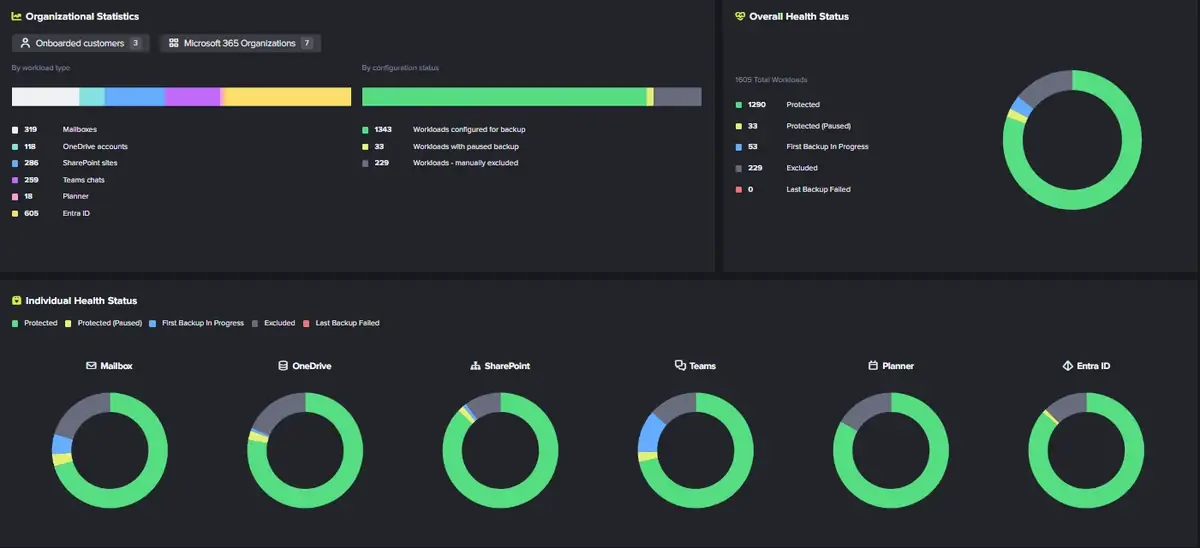
Hornetsecurity describes it as a managed service, with its own team looking into backup failures. Administration is through a web console with a dashboard for backup health, recent restores and notifications for successful, failed or warning states.
The reason to have it is the same as for any Microsoft 365 backup solution: under the Microsoft 365 shared responsibility model, recovering your data is your responsibility, and Microsoft's built-in safety nets are time-limited.
What 365 Total Backup backs up
This table follows Hornetsecurity's own description of the service.
| Workload | What Hornetsecurity lists |
|---|---|
| Exchange Online | Mailboxes, including In-Place Archive mailboxes |
| Teams | Teams chats |
| OneDrive | OneDrive for Business accounts |
| SharePoint | SharePoint document libraries |
| Planner | Listed, with granular recovery of individual items |
| OneNote | Listed; users can recover their own OneNote data |
| Entra ID | Entra ID users and groups |
Two things stand out. Teams chats are named, which several backup products leave out; our Microsoft Teams backup page explains why chats are the hard part. And archive mailboxes are named, which matters if your people have years of mail in an In-Place Archive. For SharePoint, Hornetsecurity lists document libraries, so if you depend on lists or site structure, tell us and we check the fit before you commit.
Sources (checked 11 November 2026): Hornetsecurity 365 Total Backup.
Not sure which option fits? Ask us
Tell us what you need and we will recommend the right option for your organisation, with a quote.
Where the backup is kept and how it is protected
Outside Microsoft. Hornetsecurity says backups are stored and secured on Hornetsecurity infrastructure, independent of Microsoft. That gives you a copy that does not depend on the same provider as your live data.
A region you choose. Hornetsecurity says storage is unlimited and that you control data jurisdiction by choosing the region where your data is stored. If you need UK storage, tell us and we confirm the region at quote; Microsoft 365 backup compliance covers the UK GDPR background.
Protection of the backup itself. Hornetsecurity describes:
- Immutable backups, which cannot be deleted or altered by external parties; deletion is only possible from administrative accounts within 365 Total Backup
- Encryption of backup data with an individual AES 256-bit key
- A four-eye approval process, so that sensitive actions such as deleting data or changing company settings need approval from a second administrator
- An account activity audit, covering backup changes, data browsing and restore requests, which can be exported
The four-eye approval is the distinctive feature here. It addresses the risk the NCSC's guidance calls destructive actions, whether by an attacker with a stolen admin account or by a mistake; see immutable Microsoft 365 backup.
Backup and recovery: restores and day-to-day management
For the recovery side of Hornetsecurity 365 Total Backup and recovery, Hornetsecurity lists these features for restoring and running the service:
- Version restore: any version of a file, conversation or mailbox that exists in the backup can be restored
- Search and granular recovery: backups are searchable and browsable with filters, and individual files can be selected for recovery from Planner, OneDrive and SharePoint
- End-user recovery: users can recover their own mailbox, OneDrive and OneNote data through the "Recover M365 data" feature in the Hornetsecurity User Panel
- Auto-provisioning: new users are added to the backup automatically once they are created
- Backup Pilot: rules that automatically protect chosen workload types for users and groups
- Custom retention periods, so retention can follow your own policy
If you let users restore their own data, decide the scope first and test it. Microsoft 365 backup best practices covers the settings worth agreeing at the start.
Is Hornetsecurity 365 Total Backup the right fit for you?
We will check it against your systems and requirements and recommend the right option.
UK licensing and buying at a glance
| Buying question | Answer |
|---|---|
| What is licensed | 365 Total Backup; Hornetsecurity describes one all-inclusive fee covering the service and storage. The licence unit and term are confirmed at quote |
| Storage | Unlimited, according to Hornetsecurity |
| Where the copy is kept | Hornetsecurity's own infrastructure, independent of Microsoft, in the region you choose; region confirmed at quote |
| Entra ID | Entra ID users and groups are included in the listed coverage |
| Backup frequency | Automatic, several times a day |
| Billing | Can be billed monthly, terms confirmed at quote |
| How to buy | Ask us for a quote: tell us your user count, the workloads to protect and how long you need to keep the data |
Sources (checked 11 November 2026): Hornetsecurity 365 Total Backup.
Who it suits and how we help
365 Total Backup suits organisations that work heavily in Teams chat, that want a backup held entirely outside Microsoft with one all-inclusive fee, or that already use Hornetsecurity for email security. If email security is part of the same project, see Hornetsecurity 365 Total Protection (opens in a new tab) on our email security site. For Hyper-V, VMware or Proxmox servers, Hornetsecurity's separate VM Backup product is covered on our cloud backup (opens in a new tab) site: Hornetsecurity VM Backup (opens in a new tab).
We can review what you need to protect, confirm the storage region, help connect the service to your tenant, agree retention and approvals with you, and run a test restore together. Compare it with the other platforms on Microsoft 365 backup providers, or contact us to talk it through.
How Hornetsecurity 365 Total Backup is priced
Hornetsecurity describes one all-inclusive fee that covers the service and its storage, with unlimited storage in the region you choose, so the quote is set by what you choose to protect rather than by how much storage it uses. You pick the users, groups and Microsoft 365 items to back up, and new users can be added automatically as they are created. We can size it with you and quote.
- Fee: service and storage in one
- Coverage: what you choose to protect
It can be billed monthly, terms confirmed at quote.
Our Microsoft 365 backup pricing page sets out how pricing works.
Get a quote for Hornetsecurity 365 Total Backup
Tell us what you need and we will come back to you with a quote.
How Forever Systems helps with Microsoft 365 backup
We are an independent UK IT and cyber security provider. We supply more than one Microsoft 365 backup product, so we can recommend what fits your tenant, your retention needs and your budget.
- Review what you have: we look at your Microsoft 365 licences, retention policies and any existing backup before suggesting anything new
- Help you choose: we compare the backup products we supply against the workloads you need covered, such as Exchange Online, OneDrive, SharePoint, Teams and Entra ID
- Set-up and onboarding: we can help connect the backup service to your tenant and agree what is protected and how long copies are kept
- Restore testing: we can help you plan and run test restores so you know how recovery works before you need it
- Licensing in one place: backup licences, renewals and user changes on one account, alongside the Microsoft 365 tenant they protect, with terms confirmed at quote
We work with businesses, schools, charities and public sector organisations. Contact us to talk it through.
Frequently asked questions
What does Hornetsecurity 365 Total Backup back up?
Hornetsecurity lists Microsoft 365 mailboxes including In-Place Archive mailboxes, Teams chats, Planner, OneNote, Entra ID users and groups, OneDrive for Business accounts and SharePoint document libraries.
Does 365 Total Backup back up Teams chats?
Yes. Teams chats are named in Hornetsecurity's description of what 365 Total Backup covers.
Where does Hornetsecurity store Microsoft 365 backups?
On Hornetsecurity's own infrastructure, independent of Microsoft, in a region you choose. We confirm the region at quote.
How often does 365 Total Backup run?
Hornetsecurity says backups are performed automatically several times a day.
How much does Hornetsecurity 365 Total Backup cost?
Hornetsecurity describes one all-inclusive fee covering the service and storage. The amount depends on your user count and term, so ask us for a quote.
Still have a question about Hornetsecurity 365 Total Backup?
Ask us and a member of our team will get back to you.